스마트 포인터
이해
Deref와 Drop trait을 구현한 형식은 스마트 포인터 형식으로 사용할 수 있습니다.
Box
Box를 사용하는 세 가지 경우
- 런타임에 형식의 size가 확정되지 않을 때
- 데이터가 너무 커서 transfer ownership에 따른 copy 비용을 피해야 할 때
- 값을 own하지만 구체적인 형식에는 관심이 없고 특정 trait만 필요할 때 아래 그림은 Rust 컴파일러가 recursive type의 메모리를 추론하는 과정을 간단히 나타낸 것입니다. 최종적으로 컴파일에 실패합니다.
// 以下代码会编译失败
enum List {
    Cons(i32, List),
    Nil,
}

use crate::List::{Cons, Nil};

fn main() {
    let list = Cons(1, Cons(2, Cons(3, Nil)));
}
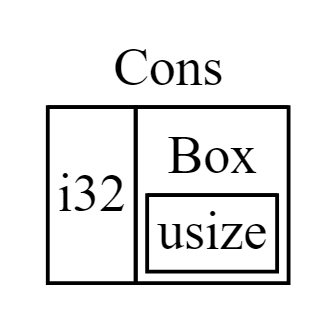 이때
이때 Box를 사용하면 컴파일러가 해당 형식의 메모리 사용량을 추론할 수 있습니다.
enum List {
    Cons(i32, Box<List>),
    Nil,
}

use crate::List::{Cons, Nil};

fn main() {
    let list = Cons(1, Box::new(Cons(2, Box::new(Cons(3, Box::new(Nil))))));
}
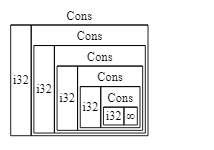
Deref & Drop
형식 변수를 함수 매개변수로 전달했을 때 매개변수 형식과 변수 형식이 다르면 Rust 컴파일러는 강제 역참조를 시도합니다(Deref trait의 deref 메서드 호출).
함수나 메서드 정의의 매개변수 형식과 일치하지 않는 특정 형식의 값에 대한 reference를 인자로 전달하면 Deref coercion이 자동으로 발생합니다.
Drop trait의 drop 메서드는 value goes out of scope일 때 호출됩니다(FILO).
drop 메서드는 직접 호출할 수 없습니다.
struct CustomSmartPointer {
    data: String,
}

impl Drop for CustomSmartPointer {
    fn drop(&mut self) {
        println!("Dropping CustomSmartPointer with data `{}`!", self.data);
    }
}
// 先调用 d 的 drop 方法,再调用 c 的 drop 方法
fn main() {
    let c = CustomSmartPointer {
        data: String::from("my stuff"),
    };
    let d = CustomSmartPointer {
        data: String::from("other stuff"),
    };
    println!("CustomSmartPointers created.");
}

// drop 不允许被主动调用,以下代码会编译失败
fn main() {
    let c = CustomSmartPointer {
        data: String::from("some data"),
    };
    println!("CustomSmartPointer created.");
    c.drop();
    println!("CustomSmartPointer dropped before the end of main.");
}
// 可以通过 std::mem:drop 间接触发 drop 的调用
fn main() {
    let c = CustomSmartPointer {
        data: String::from("some data"),
    };
    println!("CustomSmartPointer created.");
    drop(c);
    println!("CustomSmartPointer dropped before the end of main.");
}
Rc
참조 카운트이며 그래프 구현에 사용할 수 있습니다.
// 基础写法
enum List {
    Cons(i32, Rc<List>),
    Nil,
}

use crate::List::{Cons, Nil};
use std::rc::Rc;

fn main() {
    let a = Rc::new(Cons(5, Rc::new(Cons(10, Rc::new(Nil)))));
    let b = Cons(3, Rc::clone(&a));  // 使用 clone 实现浅拷贝
    let c = Cons(4, Rc::clone(&a));
}

// 使用 strong_count 获取当前变量被引用的数量
fn main() {
    let a = Rc::new(Cons(5, Rc::new(Cons(10, Rc::new(Nil)))));
    println!("count after creating a = {}", Rc::strong_count(&a));
    let b = Cons(3, Rc::clone(&a));
    println!("count after creating b = {}", Rc::strong_count(&a));
    {
        let c = Cons(4, Rc::clone(&a));
        println!("count after creating c = {}", Rc::strong_count(&a));
    }
    println!("count after c goes out of scope = {}", Rc::strong_count(&a));
}
RefCell
Box와 달리 RefCell은 runtime에 immutable 또는 mutable borrow 검사를 수행할 수 있습니다.
검사를 통과하지 못하면 프로그램이 panic합니다.
Box<T>,Rc<T>,RefCell<T>선택 참고:
Rc<T>는 여러 owner를 허용하지만Box<T>와RefCell<T>는 하나의 owner만 허용합니다.
Rc<T>는 같은 데이터의 여러 owner를 허용하고Box<T>와RefCell<T>는 단일 owner를 가집니다.
Box<T>는 컴파일 시 immutable 또는 mutable borrow 검사를 허용하고,Rc<T>는 컴파일 시 immutable borrow만 검사하며,RefCell<T>는 runtime에 두 borrow를 검사합니다.
Box<T>는 컴파일 시 immutable 또는 mutable borrow를 검사하고,Rc<T>는 컴파일 시 immutable borrow만 검사하며,RefCell<T>는 runtime에 immutable 또는 mutable borrow를 검사합니다.
RefCell<T>는 runtime에 mutable borrow를 검사하므로RefCell<T>자체가 불변이어도 내부 값을 바꿀 수 있습니다.
RefCell<T>는 runtime에 mutable borrow를 검사하므로RefCell<T>가 불변이어도 내부 값을 변경할 수 있습니다.
// 基础写法 - 和 Rc 配合使用
#[derive(Debug)]
enum List {
    Cons(Rc<RefCell<i32>>, Rc<List>),
    Nil,
}

use crate::List::{Cons, Nil};
use std::cell::RefCell;
use std::rc::Rc;

fn main() {
    let value = Rc::new(RefCell::new(5));

    let a = Rc::new(Cons(Rc::clone(&value), Rc::new(Nil)));

    let b = Cons(Rc::new(RefCell::new(3)), Rc::clone(&a));
    let c = Cons(Rc::new(RefCell::new(4)), Rc::clone(&a));

    *value.borrow_mut() += 10;

    println!("a after = {:?}", a);
    println!("b after = {:?}", b);
    println!("c after = {:?}", c);
}
Weak
강한 참조 Strong<T>를 사용하면 순환 참조가 발생해 메모리 누수가 생길 수 있습니다.
Rc::downgrade로 약한 참조 Weak<T>를 만들 수 있으며 weak_count가 1 증가합니다.
strong_count가 0이면 weak_count가 0이 아니어도 관련 ref가 해제됩니다.
약한 참조는 upgrade 메서드를 호출해 참조한 데이터를 동적으로 가져와야 합니다(반환 형식은 Option).
// 可以通过该例直观感受弱引用、强引用使用上的区别
use std::cell::RefCell;
use std::rc::{Rc, Weak};

#[derive(Debug)]
struct Node {
    value: i32,
    parent: RefCell<Weak<Node>>,
    children: RefCell<Vec<Rc<Node>>>,
}

fn main() {
    let leaf = Rc::new(Node {
        value: 3,
        parent: RefCell::new(Weak::new()),
        children: RefCell::new(vec![]),
    });

    println!(
        "leaf strong = {}, weak = {}",
        Rc::strong_count(&leaf),
        Rc::weak_count(&leaf),
    );

    {
        let branch = Rc::new(Node {
            value: 5,
            parent: RefCell::new(Weak::new()),
            children: RefCell::new(vec![Rc::clone(&leaf)]),
        });

        *leaf.parent.borrow_mut() = Rc::downgrade(&branch);

        println!(
            "branch strong = {}, weak = {}",
            Rc::strong_count(&branch),
            Rc::weak_count(&branch),
        );

        println!(
            "leaf strong = {}, weak = {}",
            Rc::strong_count(&leaf),
            Rc::weak_count(&leaf),
        );
    }

    println!("leaf parent = {:?}", leaf.parent.borrow().upgrade());
    println!(
        "leaf strong = {}, weak = {}",
        Rc::strong_count(&leaf),
        Rc::weak_count(&leaf),
    );
}
위 프로그램은 다음을 출력합니다.
leaf strong = 1, weak = 0
branch strong = 1, weak = 1
leaf strong = 2, weak = 0
leaf parent = None
leaf strong = 1, weak = 0
출처
…
Box<T>로 힙의 데이터를 가리키기
가장 단순한 스마트 포인터는 box이며 형식은 Box<T>로 씁니다. Box를 사용하면 스택이 아니라 힙에 데이터를 저장할 수 있습니다. 스택에는 힙 데이터를 가리키는 포인터만 남습니다. 스택과 힙의 차이는 4장을 참고하세요.
Box는 데이터를 스택 대신 힙에 저장하는 것 외에는 성능 오버헤드가 없습니다. 하지만 추가 기능도 많지 않습니다. 주로 다음과 같은 상황에서 사용합니다:
- 컴파일 시 크기를 알 수 없는 형식의 값을 정확한 크기를 요구하는 문맥에서 사용하려 할 때
- 많은 데이터를 소유권 이전하되 그 과정에서 데이터가 복사되지 않도록 하려 할 때
- 값을 소유하면서 구체적인 형식보다 특정 trait을 구현하는 형식이라는 점만 중요할 때 첫 번째 상황은 “Box로 재귀 형식 활성화하기” 절에서 보여 줍니다. 두 번째 상황에서는 많은 데이터를 스택에서 복사하므로 소유권을 이전하는 데 시간이 오래 걸릴 수 있습니다. 성능을 높이려면 큰 데이터를 box를 사용해 힙에 저장할 수 있습니다. 그러면 작은 포인터 데이터만 스택에서 복사되고, 포인터가 가리키는 데이터는 힙의 한 위치에 그대로 남습니다. 세 번째 경우를 trait object라고 하며, 17장에서는 “서로 다른 형식의 값을 허용하는 Trait Object 사용하기” 절 전체를 이 주제에 할애합니다. 여기서 배운 내용은 17장에서도 다시 적용합니다.