Smart Pointers
Comprehension
Types implementing the Deref and Drop traits can serve as smart pointers
Box
Three cases for using Box
- When a type’s size is unknown at runtime
- When data is large and copying from transferring ownership should be avoided
- When you want to own a value without caring about its concrete type, only a specific trait
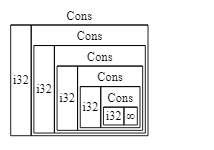
The figure below shows how the Rust compiler infers memory for a recursive type; the result cannot compile
// the following code fails to compile
enum List {
    Cons(i32, List),
    Nil,
}

use crate::List::{Cons, Nil};

fn main() {
    let list = Cons(1, Cons(2, Cons(3, Nil)));
}
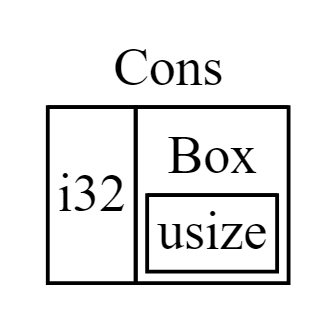
Using Box lets the compiler determine the type’s memory footprint
enum List {
    Cons(i32, Box<List>),
    Nil,
}

use crate::List::{Cons, Nil};

fn main() {
    let list = Cons(1, Box::new(Cons(2, Box::new(Cons(3, Box::new(Nil))))));
}
Deref & Drop
When a typed variable is passed as a function argument with a different parameter type, Rust attempts dereferencing coercion (calling the Deref trait’s deref method)
Deref coercion happens automatically when we pass a reference to a particular type’s value as an argument to a function or method that doesn’t match the parameter type in the function or method definition.
The Drop trait’s drop method is called when a value goes out of scope (FILO)
The drop method cannot be called explicitly
struct CustomSmartPointer {
    data: String,
}

impl Drop for CustomSmartPointer {
    fn drop(&mut self) {
        println!("Dropping CustomSmartPointer with data `{}`!", self.data);
    }
}
// call d’s drop method first, then c’s
fn main() {
    let c = CustomSmartPointer {
        data: String::from("my stuff"),
    };
    let d = CustomSmartPointer {
        data: String::from("other stuff"),
    };
    println!("CustomSmartPointers created.");
}

// drop cannot be called explicitly; the following code fails to compile
fn main() {
    let c = CustomSmartPointer {
        data: String::from("some data"),
    };
    println!("CustomSmartPointer created.");
    c.drop();
    println!("CustomSmartPointer dropped before the end of main.");
}
// trigger drop indirectly with std::mem::drop
fn main() {
    let c = CustomSmartPointer {
        data: String::from("some data"),
    };
    println!("CustomSmartPointer created.");
    drop(c);
    println!("CustomSmartPointer dropped before the end of main.");
}
Rc
Reference counting, useful for graphs
// basic syntax
enum List {
    Cons(i32, Rc<List>),
    Nil,
}

use crate::List::{Cons, Nil};
use std::rc::Rc;

fn main() {
    let a = Rc::new(Cons(5, Rc::new(Cons(10, Rc::new(Nil)))));
    let b = Cons(3, Rc::clone(&a));  // use clone for a shallow copy
    let c = Cons(4, Rc::clone(&a));
}

// use strong_count to get the number of references
fn main() {
    let a = Rc::new(Cons(5, Rc::new(Cons(10, Rc::new(Nil)))));
    println!("count after creating a = {}", Rc::strong_count(&a));
    let b = Cons(3, Rc::clone(&a));
    println!("count after creating b = {}", Rc::strong_count(&a));
    {
        let c = Cons(4, Rc::clone(&a));
        println!("count after creating c = {}", Rc::strong_count(&a));
    }
    println!("count after c goes out of scope = {}", Rc::strong_count(&a));
}
RefCell
Unlike Box and Rc, RefCell checks immutable or mutable borrows at runtime
If the check fails, the program panics
Reference for choosing
Box<T>,Rc<T>, orRefCell<T>:
Rc<T>allows multiple owners;Box<T>andRefCell<T>allow only one owner
Rc<T>enables multiple owners of the same data;Box<T>andRefCell<T>have single owners.
Box<T>checks immutable or mutable borrows at compile time;Rc<T>checks immutable borrows at compile time;RefCell<T>checks immutable or mutable borrows at runtime
Box<T>allows immutable or mutable borrows checked at compile time;Rc<T>allows only immutable borrows checked at compile time;RefCell<T>allows immutable or mutable borrows checked at runtime.Because
RefCell<T>checks mutable borrows at runtime, its inner value can be changed even when theRefCell<T>itself is immutableBecause
RefCell<T>allows mutable borrows checked at runtime, you can mutate the value inside theRefCell<T>even when theRefCell<T>is immutable.
// basic syntax - used with Rc
#[derive(Debug)]
enum List {
    Cons(Rc<RefCell<i32>>, Rc<List>),
    Nil,
}

use crate::List::{Cons, Nil};
use std::cell::RefCell;
use std::rc::Rc;

fn main() {
    let value = Rc::new(RefCell::new(5));

    let a = Rc::new(Cons(Rc::clone(&value), Rc::new(Nil)));

    let b = Cons(Rc::new(RefCell::new(3)), Rc::clone(&a));
    let c = Cons(Rc::new(RefCell::new(4)), Rc::clone(&a));

    *value.borrow_mut() += 10;

    println!("a after = {:?}", a);
    println!("b after = {:?}", b);
    println!("c after = {:?}", c);
}
Weak
Using strong references can create reference cycles and memory leaks
Rc::downgrade creates a weak Weak<T> reference and increments weak_count
When strong_count is 0, related references are dropped even if weak_count is nonzero
Weak references use upgrade to dynamically access the referenced data (returning Option> )
// this example shows the difference between weak and strong references
use std::cell::RefCell;
use std::rc::{Rc, Weak};

#[derive(Debug)]
struct Node {
    value: i32,
    parent: RefCell<Weak<Node>>,
    children: RefCell<Vec<Rc<Node>>>,
}

fn main() {
    let leaf = Rc::new(Node {
        value: 3,
        parent: RefCell::new(Weak::new()),
        children: RefCell::new(vec![]),
    });

    println!(
        "leaf strong = {}, weak = {}",
        Rc::strong_count(&leaf),
        Rc::weak_count(&leaf),
    );

    {
        let branch = Rc::new(Node {
            value: 5,
            parent: RefCell::new(Weak::new()),
            children: RefCell::new(vec![Rc::clone(&leaf)]),
        });

        *leaf.parent.borrow_mut() = Rc::downgrade(&branch);

        println!(
            "branch strong = {}, weak = {}",
            Rc::strong_count(&branch),
            Rc::weak_count(&branch),
        );

        println!(
            "leaf strong = {}, weak = {}",
            Rc::strong_count(&leaf),
            Rc::weak_count(&leaf),
        );
    }

    println!("leaf parent = {:?}", leaf.parent.borrow().upgrade());
    println!(
        "leaf strong = {}, weak = {}",
        Rc::strong_count(&leaf),
        Rc::weak_count(&leaf),
    );
}
The program above outputs:
leaf strong = 1, weak = 0
branch strong = 1, weak = 1
leaf strong = 2, weak = 0
leaf parent = None
leaf strong = 1, weak = 0
Origin
…
Using Box<T> to Point to Data on the Heap
The most straightforward smart pointer is a box, whose type is written Box<T>. Boxes allow you to store data on the heap rather than the stack. What remains on the stack is the pointer to the heap data. Refer to Chapter 4 to review the difference between the stack and the heap.
Boxes don’t have performance overhead, other than storing their data on the heap instead of on the stack. But they don’t have many extra capabilities either. You’ll use them most often in these situations:
- When you have a type whose size can’t be known at compile time and you want to use a value of that type in a context that requires an exact size
- When you have a large amount of data and you want to transfer ownership but ensure the data won’t be copied when you do so
- When you want to own a value and you care only that it’s a type that implements a particular trait rather than being of a specific type
We’ll demonstrate the first situation in the “Enabling Recursive Types with Boxes” section. In the second case, transferring ownership of a large amount of data can take a long time because the data is copied around on the stack. To improve performance in this situation, we can store the large amount of data on the heap in a box. Then, only the small amount of pointer data is copied around on the stack, while the data it references stays in one place on the heap. The third case is known as a trait object, and Chapter 17 devotes an entire section, “Using Trait Objects That Allow for Values of Different Types,” just to that topic. So what you learn here you’ll apply again in Chapter 17!